See why your agent is failing.
Open-source product analytics for MCP servers — PostHog for MCP servers. See what your agents asked for, and what your tools couldn't deliver.
No account needed · your data never leaves your stack
Your users are agents. When they fail, they fail silently.
An MCP server has no UI, no clicks, no funnel. When an agent can't do something through your tools, it doesn't file a bug or rage-click — it gives up, rephrases, or hallucinates a workaround, and you never hear about it.
Without mcpeye
Latency and error rates say your server is up. You still have no idea which goals your agents keep whiffing on — or what they needed that you never shipped.
With mcpeye
Every intent, argument, result and error — sessionized, summarized, and turned into a ranked build-next roadmap of the asks your tools couldn't deliver.
The Intent Gap Report
A ranked, deduped list of the asks your tools couldn't deliver — plus the capabilities agents wanted that no tool exists for yet. It's a build-next roadmap your agents are writing for you, for free.
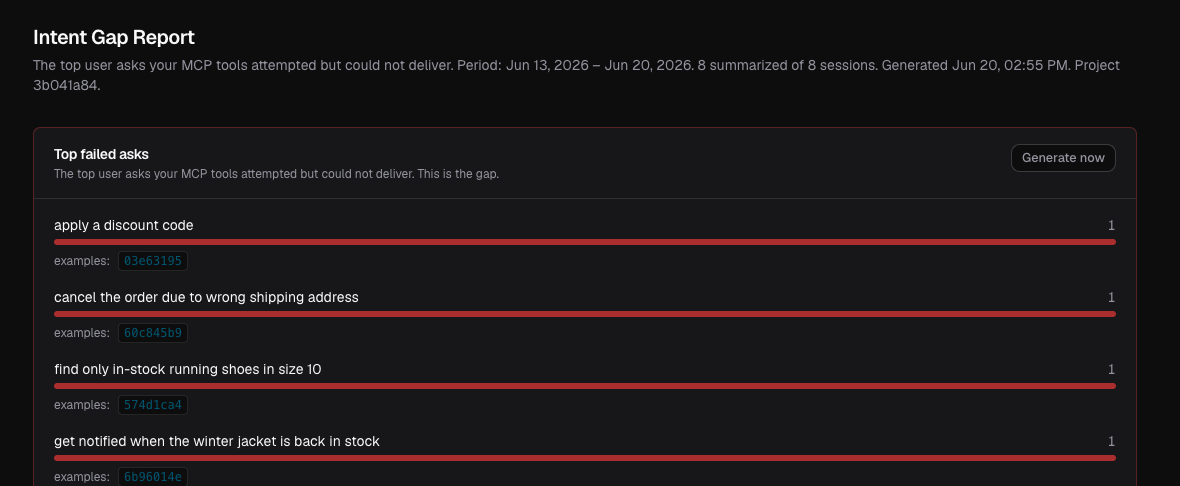
- Top failed asks — a tool was called but couldn't satisfy the goal.
- Missing capabilities — captured both inferred and explicitly requested, ranked by confidence.
- Every row links to the exact sessions behind it.
Replay every move an agent made
Step through a whole agent interaction as one coherent transcript — every tool call, its self-reported intent, arguments, result, and errors. Search by user email to debug a specific report.
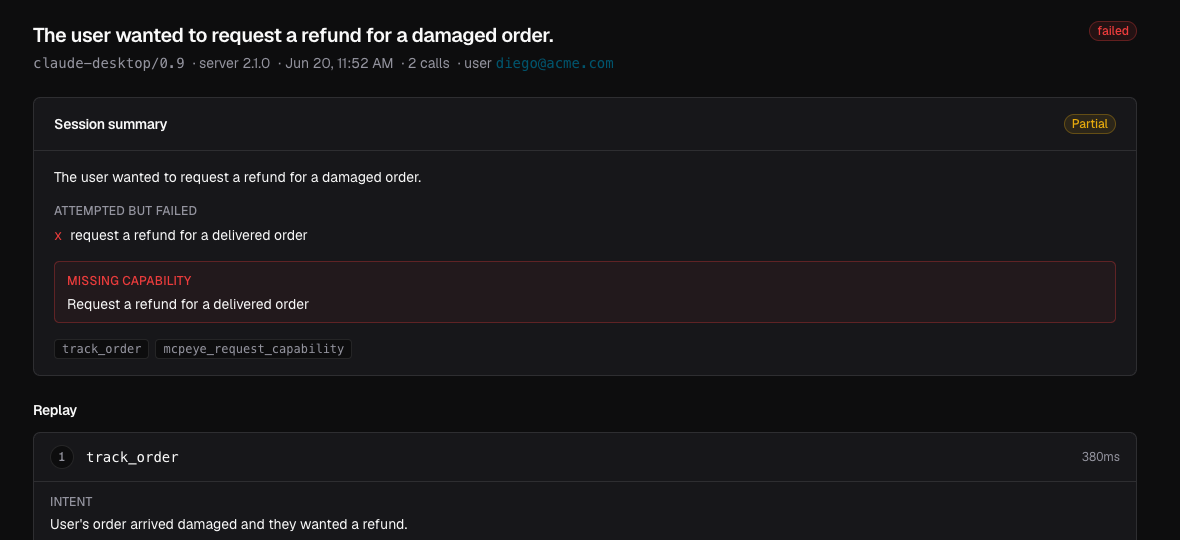
- Read a full run instead of scattered log lines.
- See the intent behind every call, inline.
- Jump straight to the moment an agent got stuck.
Know what agents are actually trying to do
Every distinct thing people use your server for, clustered into a use-case taxonomy and ranked by volume — each with a success / partial / failed rate. One number tells you the truth: what % of agent goals actually succeed?
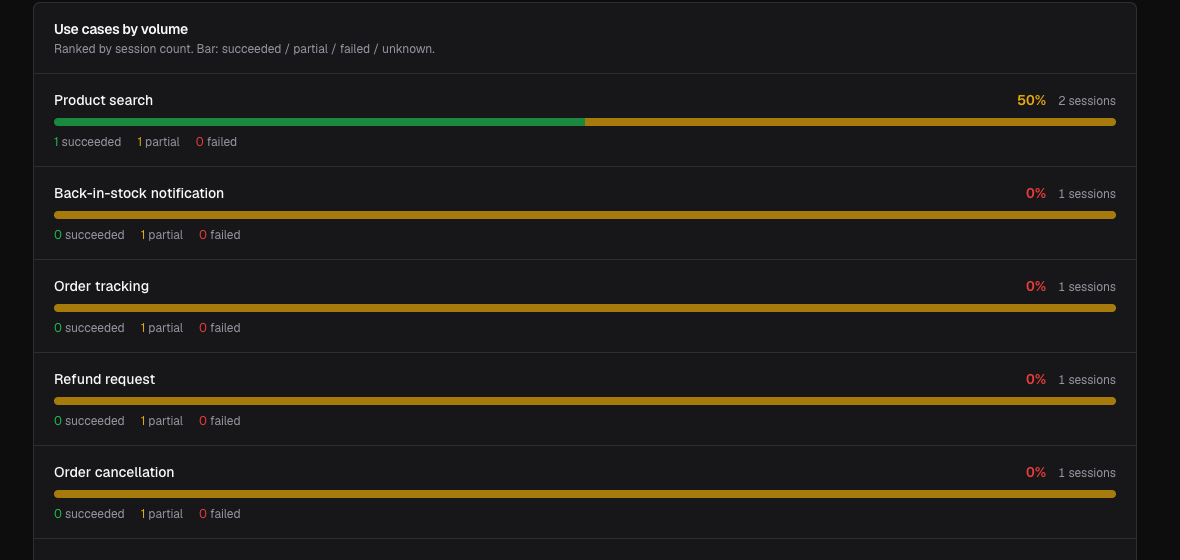
- Auto-clustered use cases, no manual tagging.
- Per-goal success rate, plus what's newly on the rise.
- Spot the goals your server consistently fails.
One line in your server. One command to self-host.
The SDK injects an optional mcpeyeIntent parameter into every tool's schema, so the agent self-reports its intent inline — no per-call LLM, near-zero overhead. The LLM only runs later, in the worker, with a key you provide.
import { track } from "mcpeye";

// one line — the agent self-reports intent, no per-call LLM
track(server, "your-project-id");No per-call LLM. No data leaving your stack.
Instrument
Add the one-line SDK. It injects mcpeyeIntent into every tool schema.
Ingest
Tool calls stream to your self-hosted API and land in Postgres.
Summarize
A worker sessionizes runs and clusters them with your LLM key — never on the hot path.
See the gaps
Read the Intent Gap Report, replay sessions, track goal success.
Product analytics built for MCP, not bolted on.
Intent Gap Report
The asks your tools couldn't deliver — a ranked build-next roadmap.
Session replay
Step through every tool call with intent, args, result, errors.
Agent goals
Use-case taxonomy with per-goal success rates.
Repeated-call detection
Tools agents hammer in loops → batch-endpoint candidates.
Error patterns
The errors that hurt, clustered and ranked.
Polyglot SDKs
TypeScript, Python & Ruby — same one-line track() API.
Self-hosted
docker compose up brings up the whole stack.
Private by design
Postgres, Redis & your LLM key are yours. Nothing egresses.
Weekly report
A markdown + CSV digest you drop into your roadmap doc.
100% open-source. 100% self-hosted. Yours.
The whole product is MIT-licensed — no feature gates, no "open core" asterisks. Your agents' tool calls contain your users' literal requests, the most sensitive product data you have. With mcpeye it never leaves your infrastructure: Postgres, Redis and the LLM key are all yours.
- MIT licensed — fork it, audit it, ship it
- A managed cloud is coming if you ask for it
- Anonymous, opt-out telemetry only
- Works with any MCP server, any host
The open-source MCP analytics layer.
MCPcat tells you what happened; mcpeye tells you what to build. Langfuse traces the model; mcpeye works at the tool layer. PostHog instruments the UI — agents never touch the UI.
| mcpeye | MCPcat | Langfuse | PostHog | |
|---|---|---|---|---|
| Open-source & self-hostable | ✓ | closed | ✓ | ✓ |
| Built for MCP servers | ✓ | ✓ | model layer | web apps |
| Intent Gap Report (build-next roadmap) | ✓ | partial | — | — |
| Missing-capability capture | ✓ | — | — | — |
| Session replay of agent tool calls | ✓ | ✓ | traces | web |
| Your data never leaves your stack | ✓ | — | ✓ | ✓ |
Questions, answered.
What is mcpeye?+
mcpeye is open-source, self-hosted product analytics and observability for MCP (Model Context Protocol) servers — think PostHog for MCP servers. It gives you the Intent Gap Report, session replay, and agent-goal analytics so you can see why your agent is failing.
How is it an MCPcat alternative?+
Unlike hosted-only tools, mcpeye is fully open-source (MIT) and self-hosted, so you own your data and run it on your own infrastructure with a single docker compose up. It adds the Intent Gap Report — a build-next roadmap of the capabilities agents asked for but your tools couldn't deliver.
What is the Intent Gap Report?+
It surfaces the asks AI agents made that your MCP tools couldn't fulfill, plus the capabilities they're missing — turning real agent behavior into a prioritized build-next roadmap, with example sessions behind every row.
How do I install it?+
Add the one-line SDK to your MCP server in TypeScript, Python, or Ruby — track(server, "id") — and self-host the backend with docker compose up. No account needed. Full guides live at docs.mcpeye.dev.
Is it really free and open-source?+
Yes — MIT-licensed, free, and self-hostable, the whole product. The source is on GitHub at github.com/mcpeye/mcpeye.
See why your agent is failing.
Self-host mcpeye and read your first Intent Gap Report in minutes.